Atlantis — Quick Paste Library Plugin
[ As of Touch Dial version 2.0 this plugin will be included automatically in the main software; no need to download the plugin file simply update the application to the latest version – Attachment has been removed to prevent confusion ]
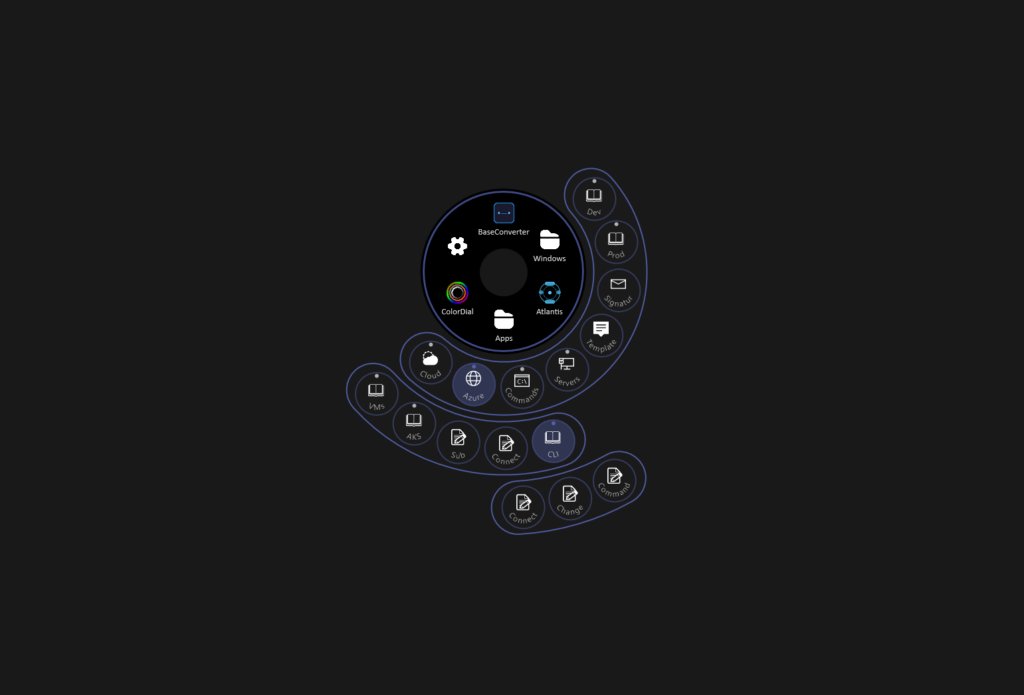
A “clipboard” library plugin for Touch Dial that lets you save and organize text snippets, rich text, and images into “books” (folders) and “pages” to easily keep them all in one place.
Click a “page” on the overlay to instantly paste its content — perfect for email signatures, code snippets, canned responses, commands, or any text you use frequently.
You can also use this for video games, since Touch Dial runs on top of full screen games, you can use this for cheat codes or commands.
For example: Create a Book (folder) per game, and pages includes your commands/cheats. Clicking on them send the keystrokes into your full screen game.
(Output Mode “Type Out” recommended for games, not “Clip Board”)
“Type Out mode” Improvements :
– Type Out now sends real keystrokes, so games like Minecraft register them (e.g. / opens the command bar).
– You can now add special keys in the Text field:
Add special keys: [ENTER], [TAB], [SHIFT], [ESC], [BACKSPACE], [DEL], arrows ([UP]…), [F1]–[F12], alongside combinations as: [CTRL+A], [SHIFT+ENTER], [CTRL+SHIFT+P].
– You can now add time delays between keys. [1s], [100ms], [1.5s] insert a one-time pause at that point.
All Surrounding text still types normally, so “/ [1s] weather rain [ENTER]” executes the “/” key then waits 1 second before sending the rest of the text ending in ENTER key press.
Supports plain text (Type Out) and rich text rtf (Paste) output modes, with content stored locally in Documents/Atlantis-Library as .rtf files which makes it easy to back them up.
You can also change the default directory if needed — this way you can store these files on Encrypted/Cloud drives.
Changing the directory will also move all of the files automatically to the new directory.
Deleting the plugin or uninstalling/updating Touch Dial will not remove the files created.
Each Ring can fit:
– Ring 1 : up to 15
– Ring 2 : up to 23
– Ring 3 : up to 31
If you were to Max this up you could fit a max of 15 × 23 × 31 = 10,695 pasteable items.
A few examples:
– Email signatures — work, personal, and branded signatures with images and formatting
– Canned responses — quick replies for support tickets, Slack, or client emails
– Code snippets — frequently used functions, SQL queries, or config blocks
– Form filling — addresses, phone numbers, account IDs you type repeatedly
– Streaming/content creation — chat commands, description templates
– Meeting notes — agenda templates, standup formats, follow-up outlines
– Multilingual support — same message in different languages, ready to paste
– API testing — JSON payloads, auth tokens, endpoint URLs
How to use:
1. Go to Settings > Plugins Section > Atlantis
2. Create books and pages with your content.
Optional method – Go to “Documents/TouchDial/Atlantis-Library” and manually create folders and .rtf or .txt files with your content. Restarting Touch DIal will auto-scan this directory and auto add them to your plugin.
3. Customize button Icons/Names as needed.
4. Go to Button section, create a new button, set actions to Atlantis and Save settings.
5. Now you can use the button from the dial.
Version History
v1.0
– Initial Release
v1.1
– Added additional formatting when adding text to a page.
v1.2
– Fixed serialized hardcoded user paths resulting in errors in the logs.
v1.3
– Darkness setting added for background control.
– On Touch Dial Version 1.0.15+ the accent color syncs with the dial’s Outer Ring.
v1.4
– Additional Language Support including Chinese simplified & Hindi. (8 Total)
v1.5
– Fixed paste formatting conflicts.
– Atlantis islands now scale proportionally with the dial size
v1.6
– Manually managing folders and .rtf or .txt files (new addition) under \Documents\TouchDial\Atlantis-Library\ will be automatically updated in the Plugin config on app start.
– Multiple “Type Out mode” Improvements were added specially for use with Video Games (view top of Post).
– Small UI corrections.
0 Comments