Pixel Art – Aseprite
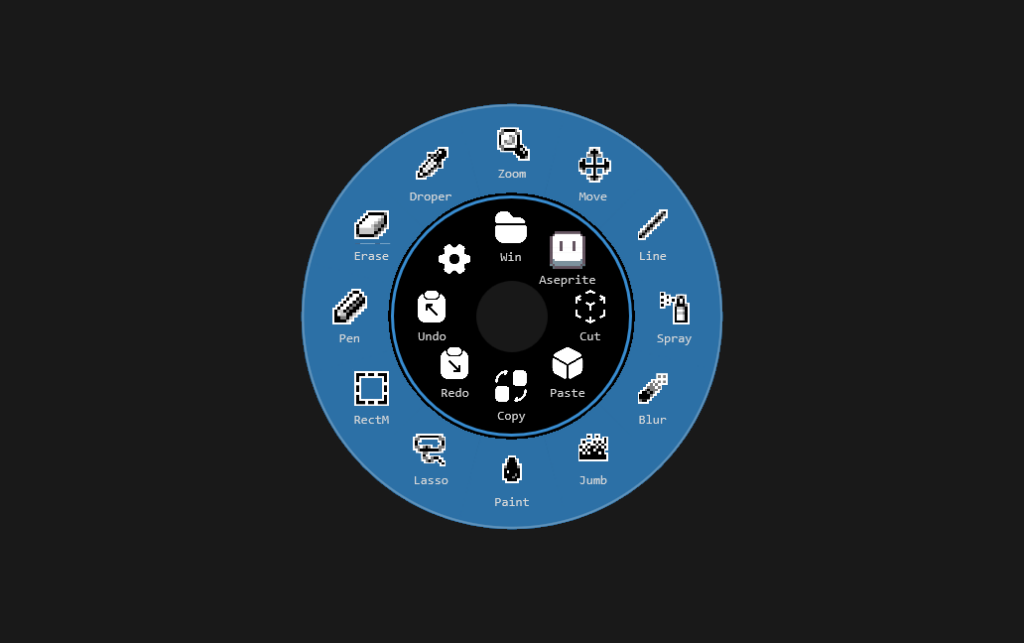
I’ve created this Backup as an example.
This is a configuration I use when I draw Pixel Art. The idea of the shortcuts is that when I draw Pixel Art I do NOT have a keyboard handy, so basic commands like copy/paste/etc are included in the inner Dial and easy to access with out a keyboard and the Aseprite Folder contains the Tools I use more often.
This way, while holding the screen with my left hand I have the Dial and Color Pallet on the left and I use my Pen with my right hand. No need to use mouse or keyboard at all as I control everything with my Left Hand.
When you create a Backup from the Backup Tab the following will be saved:
1. All buttons and folders already configured on the Dial.
2. All custom folders that you currently have saved under the Folder Tab.
3. All plugins you have currently installed.
3. All settings, Colors, Font, Text/Icon Sizes, etc.
4. All imported icon packs.
5. All created Macros.
NOTE: A full backup also backs up and restores installed plugins with the plugin versions at the time of backup creation. Make sure you install the latest plugins and update your backups accordingly.
The only thing that will not be saved inside a Backup, is if you had other Backups already created. (This is to prevent backups inside backups…etc)
To import this backup go to:
Settings > Backup and Restore > Click the Backup TAB > Import > Select your .tdial file.
Note: Due to a bug icons were not being imported correctly, make sure you are using Touch Dial version 1.0.22 or higher which fixes this bug.
0 Comments