
Query Search Plugin
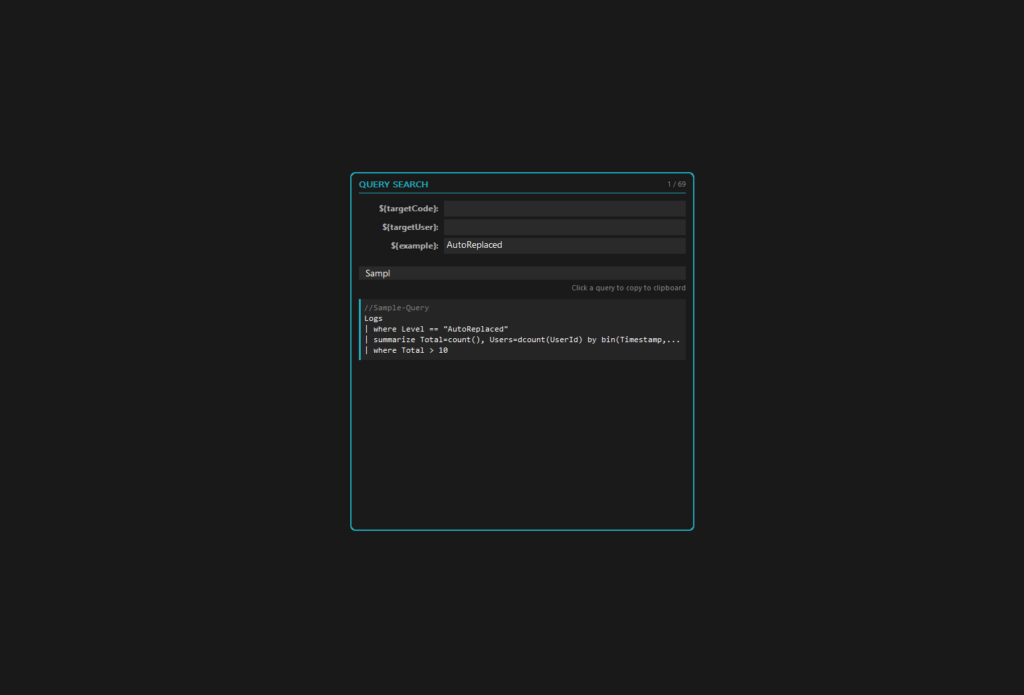
[ As of Touch Dial version 2.0 this plugin will be included automatically in the main software; no need to download the plugin file simply update the application to the latest version – Attachment has been removed to prevent confusion ]
Store frequently used queries (KQL, SQL, PowerShell, etc.), define custom variables with ${name} placeholders for automatic substitutions, and search/copy queries with one click.
Separate each query with an empty line when adding them in the Query section in settings.
The Search field allows you to quickly search through your queries and the updated query is copied to your clipboard when clicked.
How to use:
1. Go to Settings > Plugin Section > Click on Query Search
2. Paste all your queries, leave an empty line between them to separate the queries
3. Create any variables you need to auto replace them
4. Create a new button, set the Action to Query Search, Save settings.
5. Click the button on the DIal to open the plugin and search through your queries.
Version History
v1.0
– On Touch Dial Version 1.0.15+ the accent color syncs with the dial’s Outer Ring.
v1.1
– Additional Language Support including Chinese simplified & Hindi .(8 Total)
v1.2
– Position logic update during dial movement.
0 Comments